
Ask Claude or ChatGPT how AI sees you, with Ripplix's numbers.
Connect Ripplix to the Claude or ChatGPT your team already uses, then ask what you'd ask an analyst: who's ahead of us, which pages does AI cite, why isn't this page in AI answers, which prompts should we fix first. It answers from your own Ripplix data.
ACME CRM scores 58 out of 100 for AI visibility over the last 30 days, 6 points down on the 30 days before.
- AI mentions you in about 3 of every 10 answers to general CRM questions.
- Globex CRM is ahead: when people ask for a recommendation, AI lists it first in 346 of 819 lists, and 163 of those leave you out.
- You're strongest on CRM for small business, named in 417 of 750 answers, and weakest in Google AI Overviews: 168 of 780 answers, against 309 for ChatGPT.
Want me to look at which topics caused the drop?
Start with integrations. On its five general questions, AI names ACME CRM in only 5 to 13% of answers, and Globex CRM in 61 to 73%. The weakest two:
- “How do I sync my CRM with my email marketing tool?”: you're named in 7 of 150 answers, Globex CRM in 92.
- “CRM that connects to accounting software”: 12 of 150, down from 25 in the 30 days before.
Then the prompts where you fell most on the 30 days before:
- “How do I track a sales pipeline without spreadsheets?”: named in 42 of 150 answers, down from 73.
- “Simple CRM for a one-person business”: 83, down from 105.
- “Which CRM is easiest to set up for a small team?”: 80, down from 101.
Want me to check which pages AI cites for the integrations questions?
In the last 30 days, AI didn't cite /blog/how-to-set-up-a-sales-pipeline once in the 900 answers to your sales pipeline questions. Asked “How do I track a sales pipeline without spreadsheets?”, it cites your pipeline feature page (100 of 150 answers), then Globex CRM's home page, a Reddit thread, a YouTube review, Wikipedia and TechRadar.
The guide's Content Optimization report scores it 48 out of 100, and 87 with all 13 recommendations. What holds it back:
- It leaves out testing your data import, why pipelines drift, the spreadsheet-or-CRM question and ACME's own prices.
- It names no author and cites no source for its benchmark figures.
That spreadsheet question matters: AI named ACME CRM in 42 of its 150 answers, down from 73 in the 30 days before.
Want me to turn the recommendations into tasks for your content team?
13 of 15 AI crawlers can read acmecrm.example. Your robots.txt blocks two:
- Google-Extended, which controls whether Gemini may use your pages.
- CCBot, Common Crawl's crawler, whose data many models learn from.
Your last site crawl checked 56 URLs and found 5 issues, 1 of them high priority. Fix first:
- The broken link: a link on your site points to a page that no longer exists.
- The 2 pages missing from your sitemap.
- The page with no main (H1) heading.
Your Win/Loss report calls it a loss: AI names ACME CRM late, if at all. It appears in 29% of the answers, fourth behind Globex CRM (75%), Initech Sales (63%) and Northwind CRM (46%).
You have both features the question asks for, but your pages call them “sales forecast” and “outreach cadences”, and ACME is missing from the independent lists the assistants copy from. The report's first three steps:
- Publish a “Pipeline forecasting and email sequences” feature page in the question's own words.
- Turn your “best CRM for small sales teams” page into a direct answer, with a short summary and a comparison table.
- Pitch ACME CRM to the independent lists the assistants cite.
Connected in a few clicks.
No keys to copy and nothing to install. Where your plan needs it, an admin adds Ripplix once; then each person connects their own assistant with their own Ripplix login.
Switch on
We switch the connector on for your company. Your team then finds the address and the steps in Ripplix, under Settings, Claude & ChatGPT.
Add
In Claude, add Ripplix as a custom connector; on Team and Enterprise, your Claude Owner adds it once for everyone. In ChatGPT, your workspace admin adds it as an app.
Sign in
Press Connect, sign in to Ripplix and press Allow on a page that names the assistant and your company.
Ask
Ask what you would ask an analyst: how you are doing, who is ahead, what to fix first. The assistant reads the same figures your Ripplix screens show.
Stay in control
Everyone sees their own connections on the Claude & ChatGPT page, and can disconnect any of them in one click.
Your Monday update, written from your own data.
Because the assistant reads Ripplix directly, it can pull figures from several screens into one answer: a briefing for a meeting, a summary for your boss, or a list of tasks for your web team.
- AI visibility 58, down 6 on the previous 30 days; share of voice 26.3%, down 2.2 points.
- Ranking: second of four, behind Globex CRM (34.1% of mentions), ahead of Initech Sales and Northwind CRM.
- Tone: mostly favourable, 79 out of 100, unchanged.
- Strongest topic: CRM for small business. Weakest place: Google AI Overviews.
- Next: decide on the two AI crawlers our site blocks, and act on the pipeline Win/Loss report.
Ask about your brands' AI visibility, your site and your reports.
Your AI visibility
Your visibility score, share of voice, position and mentions, how you rank against each competitor, how AI talks about you, the pages and sites it cites, the topics it ties you to and how each of your prompts is doing.
Your site and traffic
Which AI crawlers your site lets in, your Site Audit findings ranked by what to fix first, visits from AI assistants, the web searches Claude runs behind its answers and the discussions AI draws on.
Your reports
Your Content Optimization and Win/Loss reports, read in full, so the assistant can summarise them or turn them into tasks; plus your tracked questions and your credits.
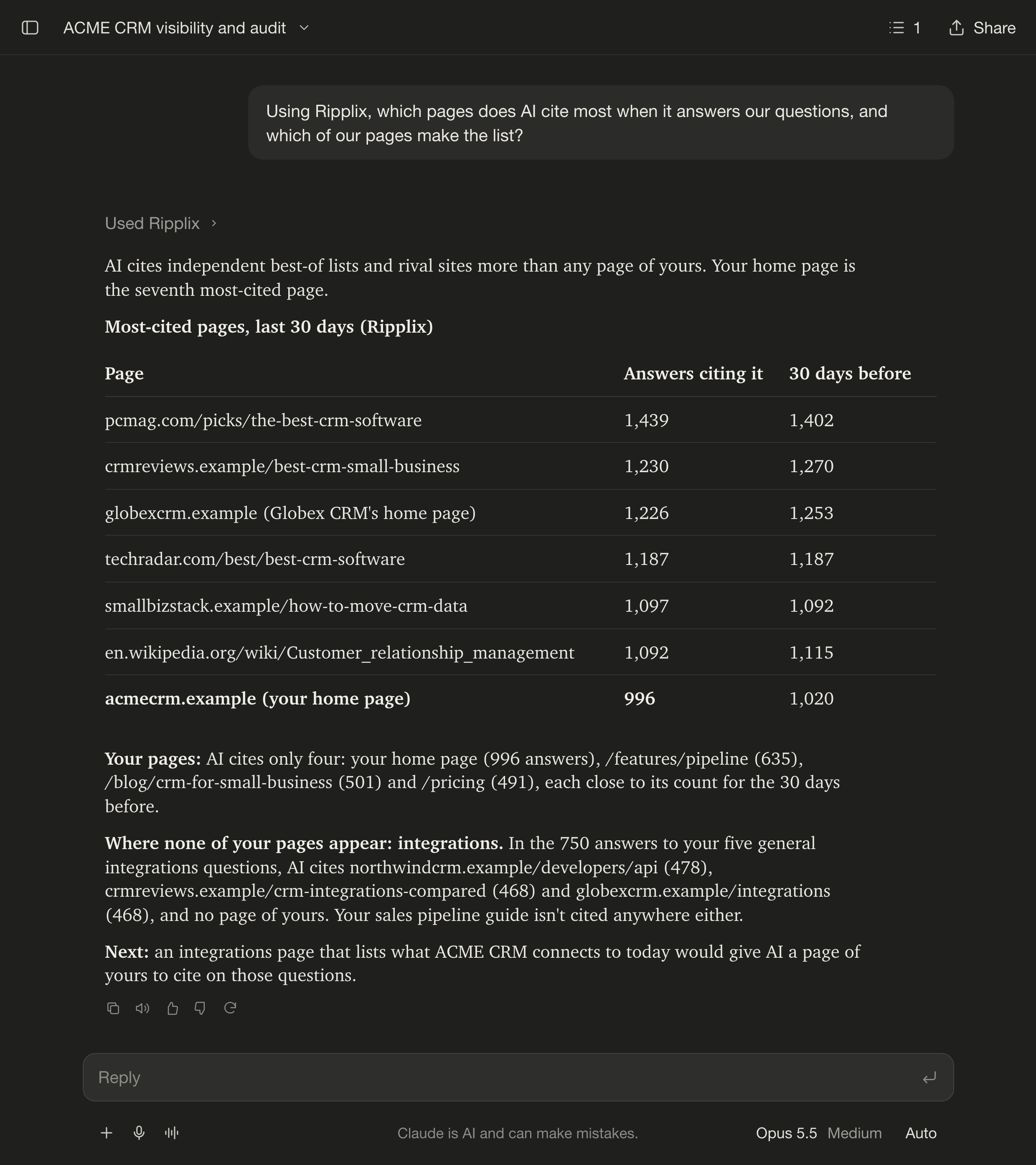
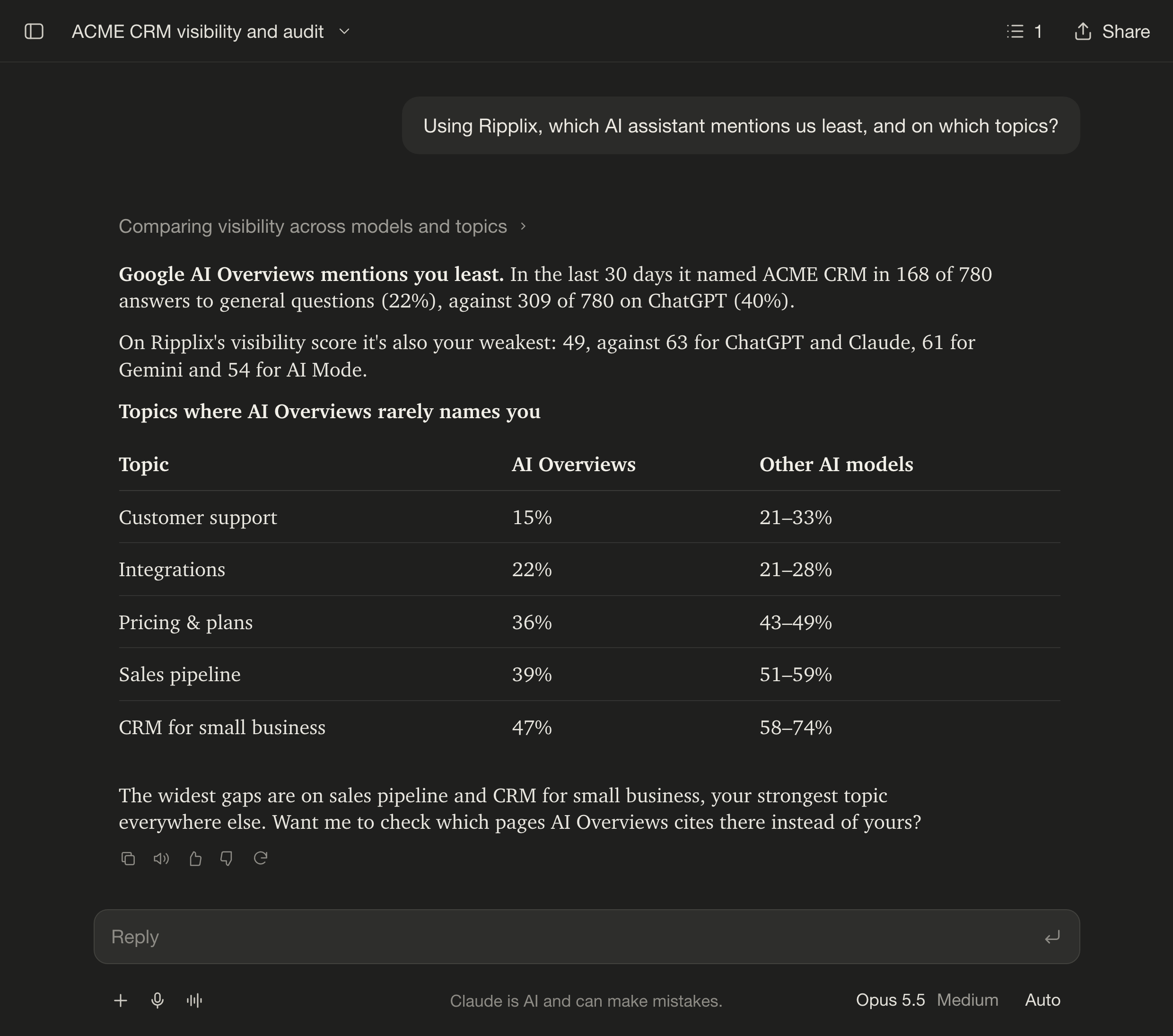
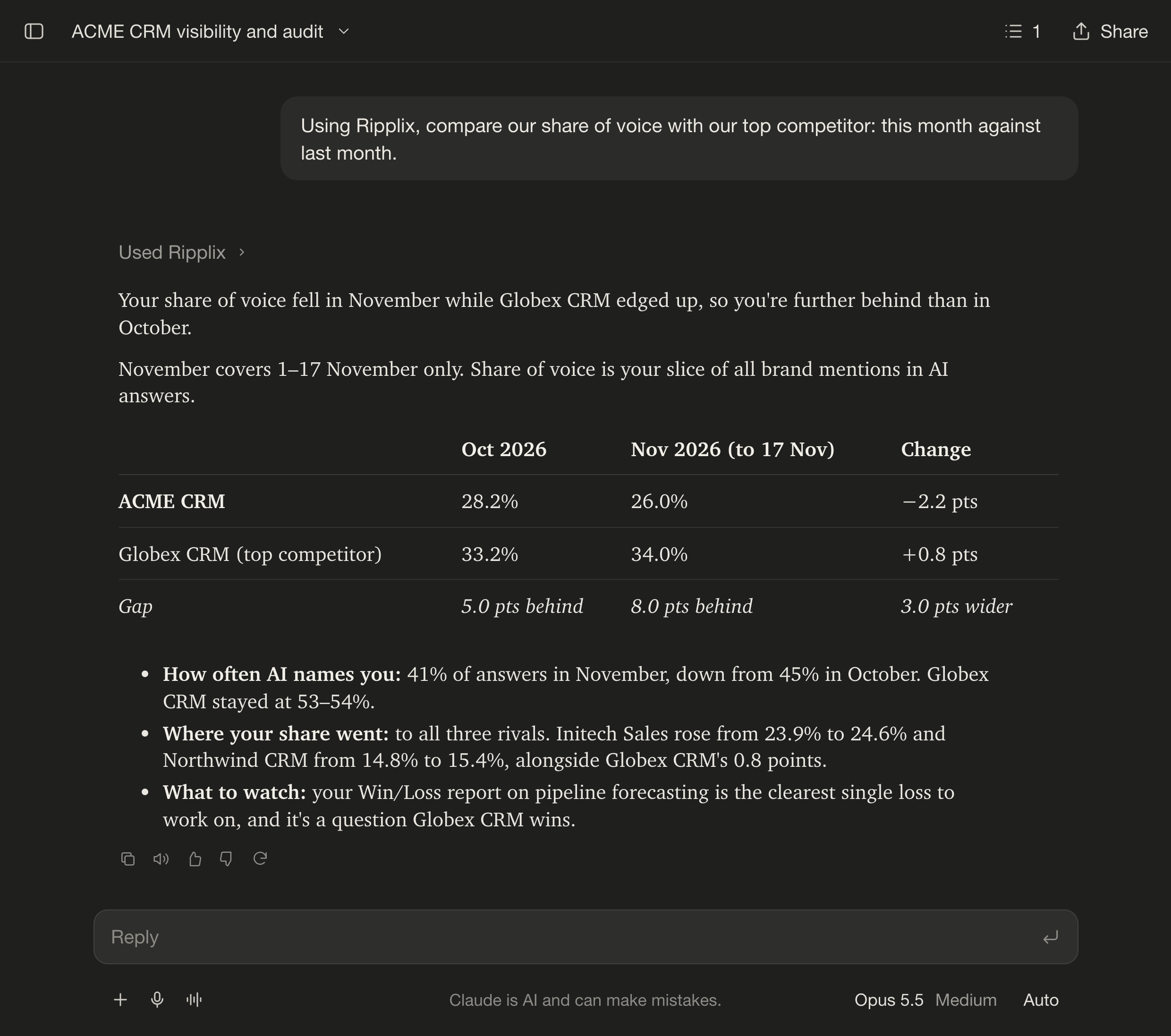
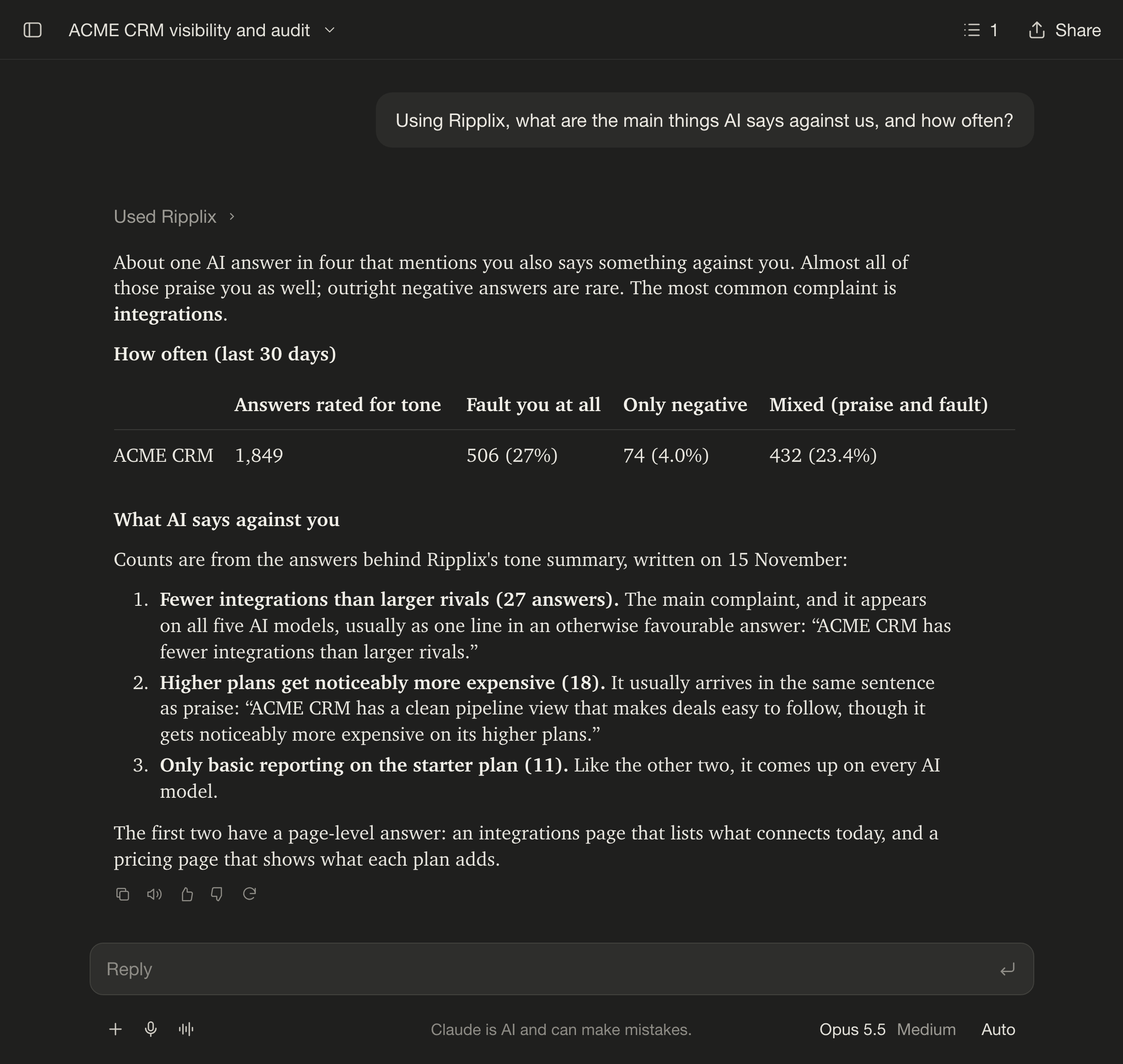
What it looks like in Claude.
Example conversations in Claude with Ripplix connected, shown on ACME CRM, our example brand. Claude reads the figures from Ripplix and answers in its own words, with tables where they help.
Your AI visibility, in the assistant you already use.
Start with your free AI Visibility Report. The connector is switched on for your company by the Ripplix team.
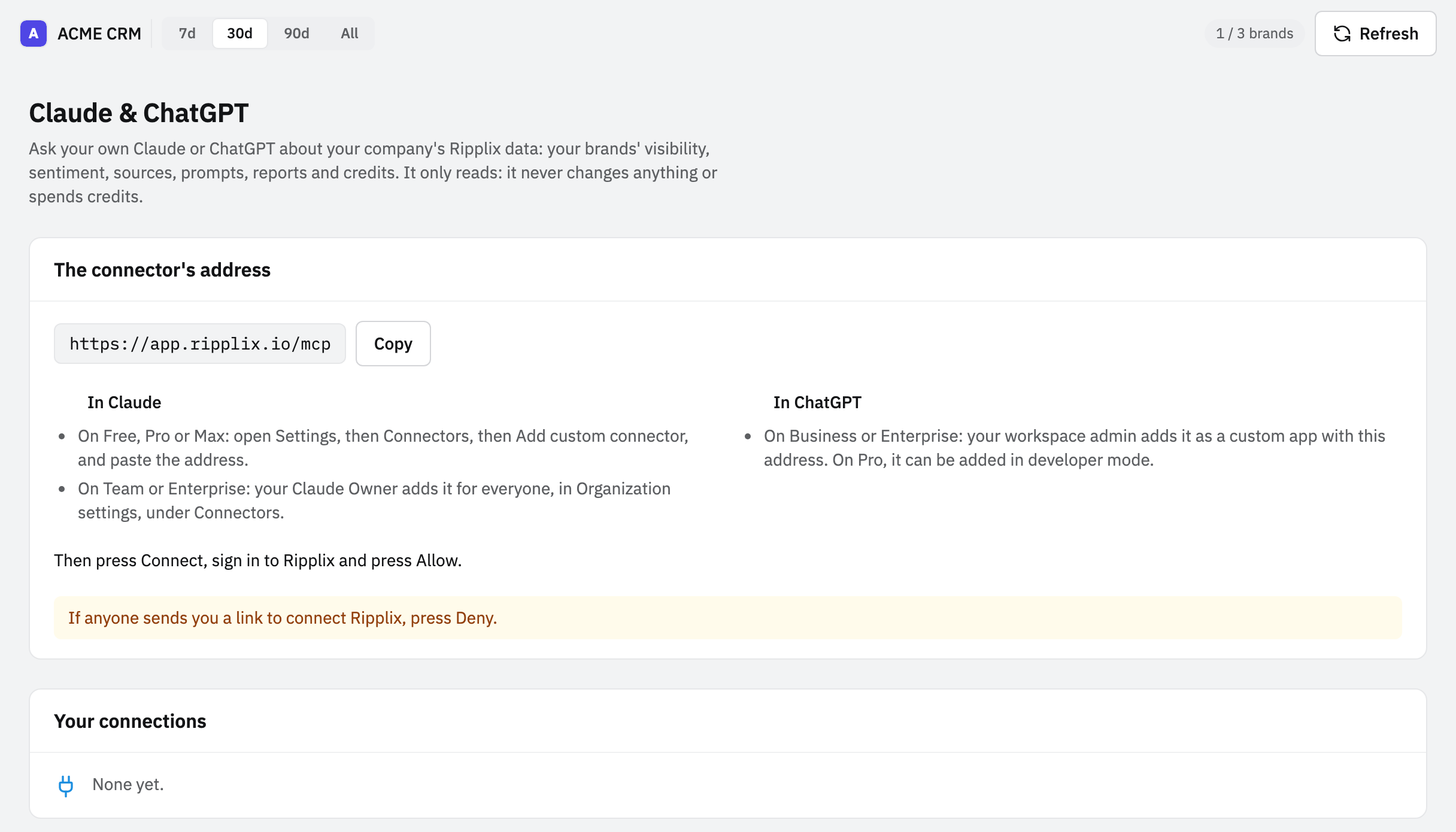
Everything your team needs to connect, on one page in Ripplix.
The Claude & ChatGPT page in Ripplix holds everything your team needs: the connector's address to copy, the steps for each plan of Claude and ChatGPT, and the list of their own connections.
It reads. It never writes, and it never spends.
Read-only
It cannot change your brands, prompts, settings or reports, and it never spends credits.
Your company only
Each person signs in with their own Ripplix login and only ever sees their own company's data.
Disconnect in one click
Disconnect any connection from the Claude & ChatGPT page. Changing your password ends all of your connections, and switching the connector off for your company stops everyone's.
Ask your assistant how AI sees you.
Start with your free AI Visibility Report, then ask us to switch on the connector for your team.
Everything you wanted to know about Ripplix in Claude and ChatGPT.
Short answers. For the long ones, talk to us.