SEO PERFORMANCE + SITE AUDIT

See how your site performs in Google — and what to fix next.

Bring your Google Search Console and Analytics data together with a comprehensive site audit. Track keyword and page performance, spot what's changing, and identify the technical issues affecting your search visibility.
Daily SEO performance trackingKeyword and page-level insightsPrioritised technical site audits
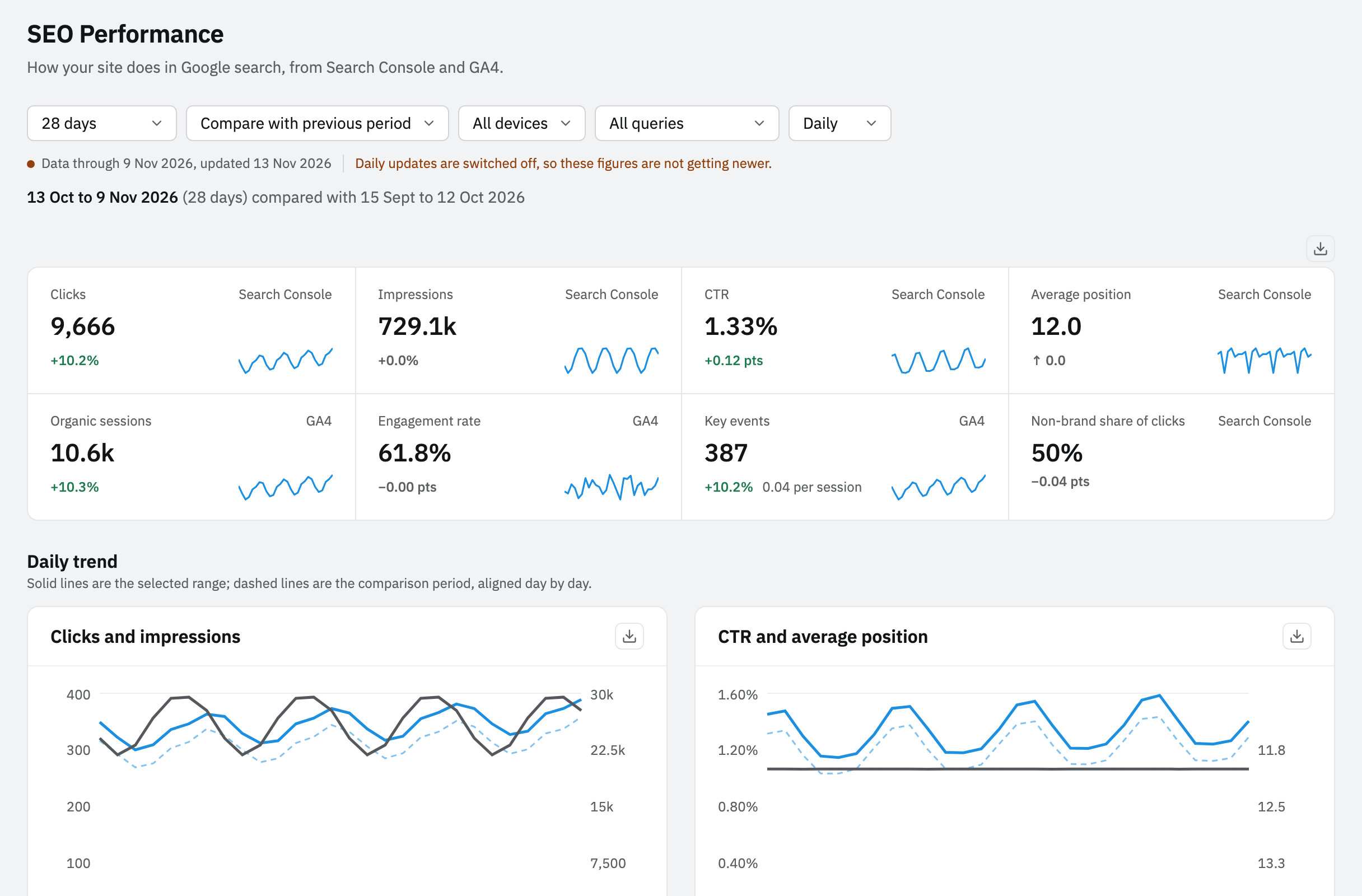
SEO Performance · ACME CRM · compared with the period before
Updated every day
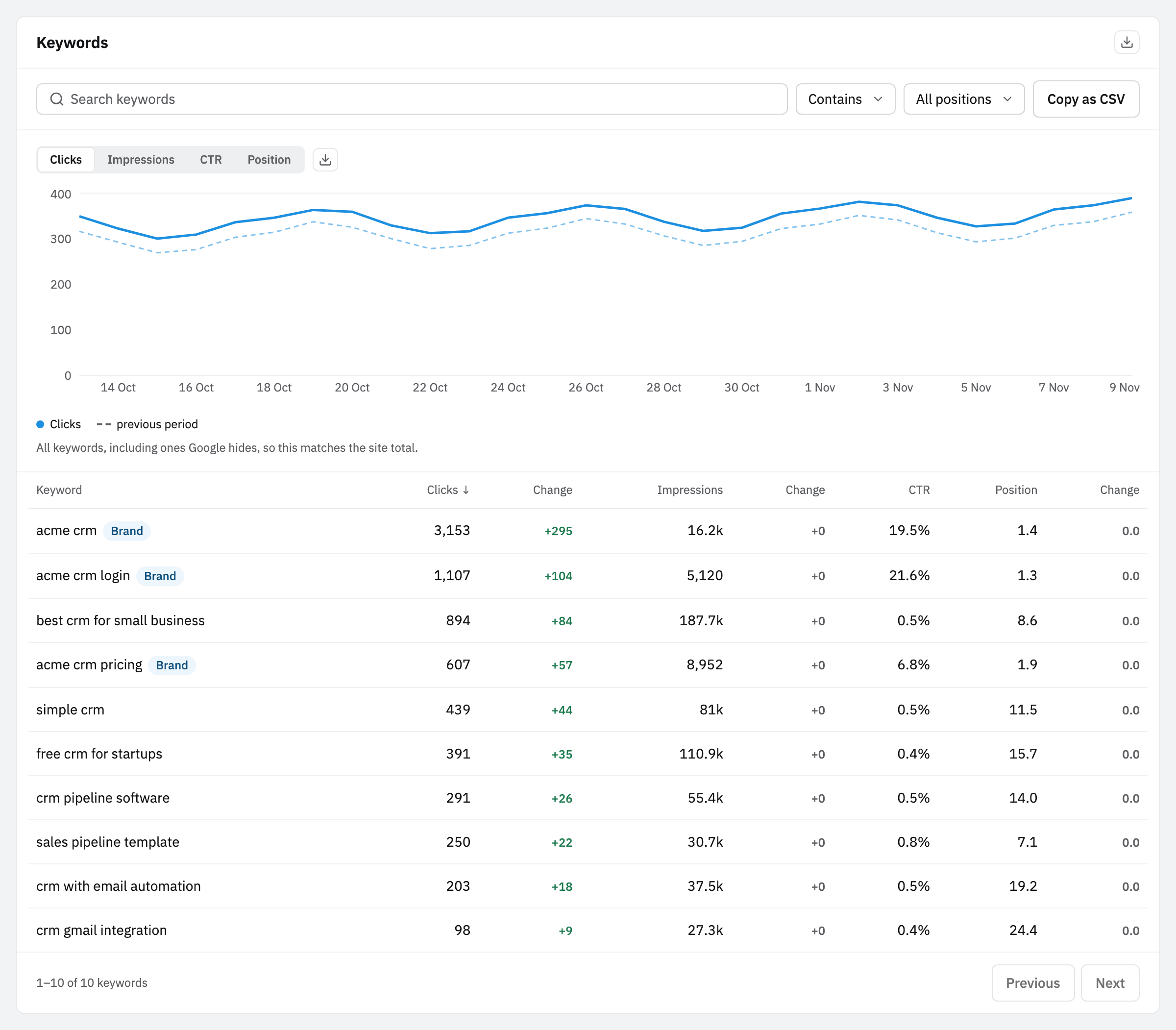
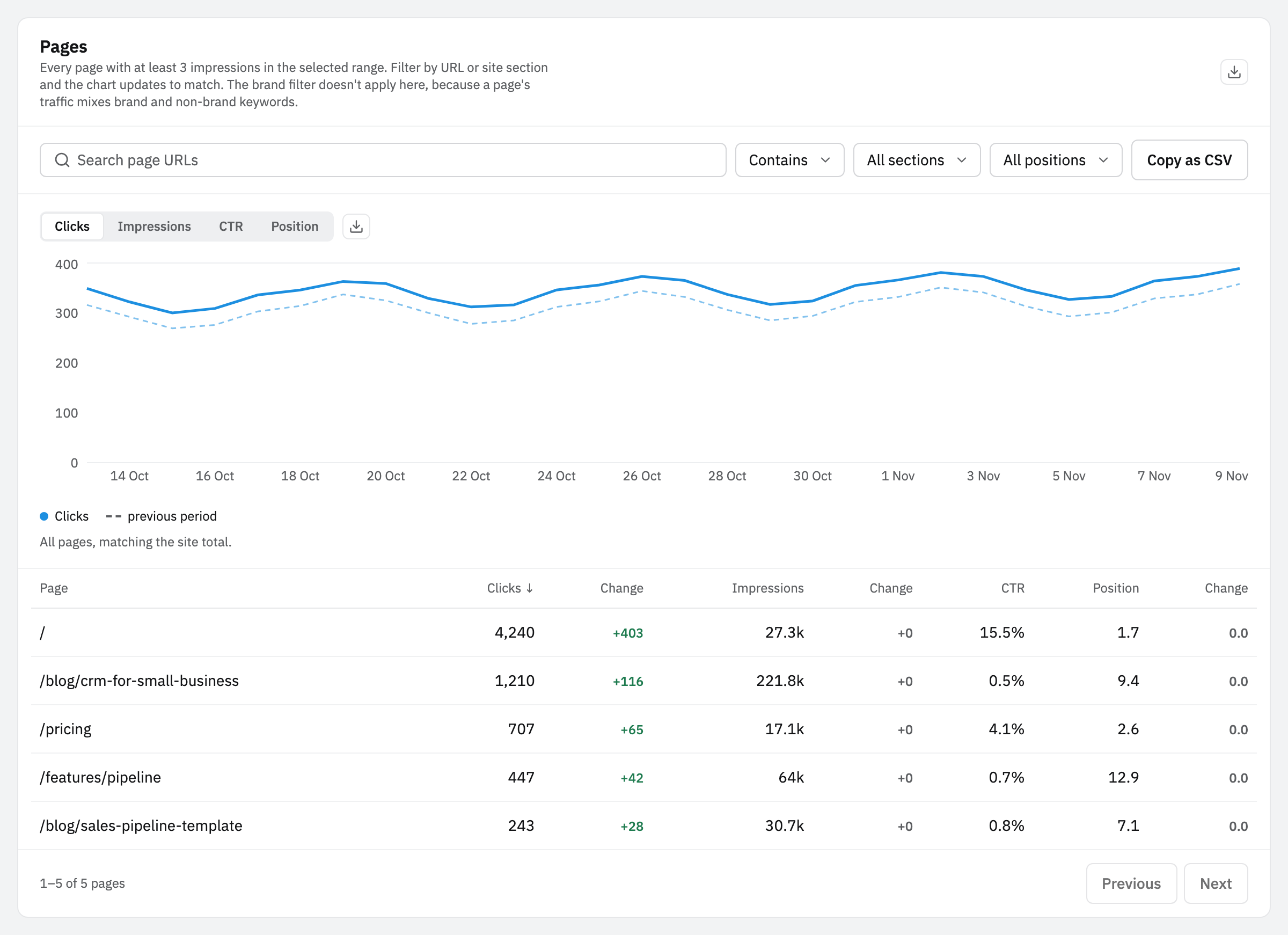
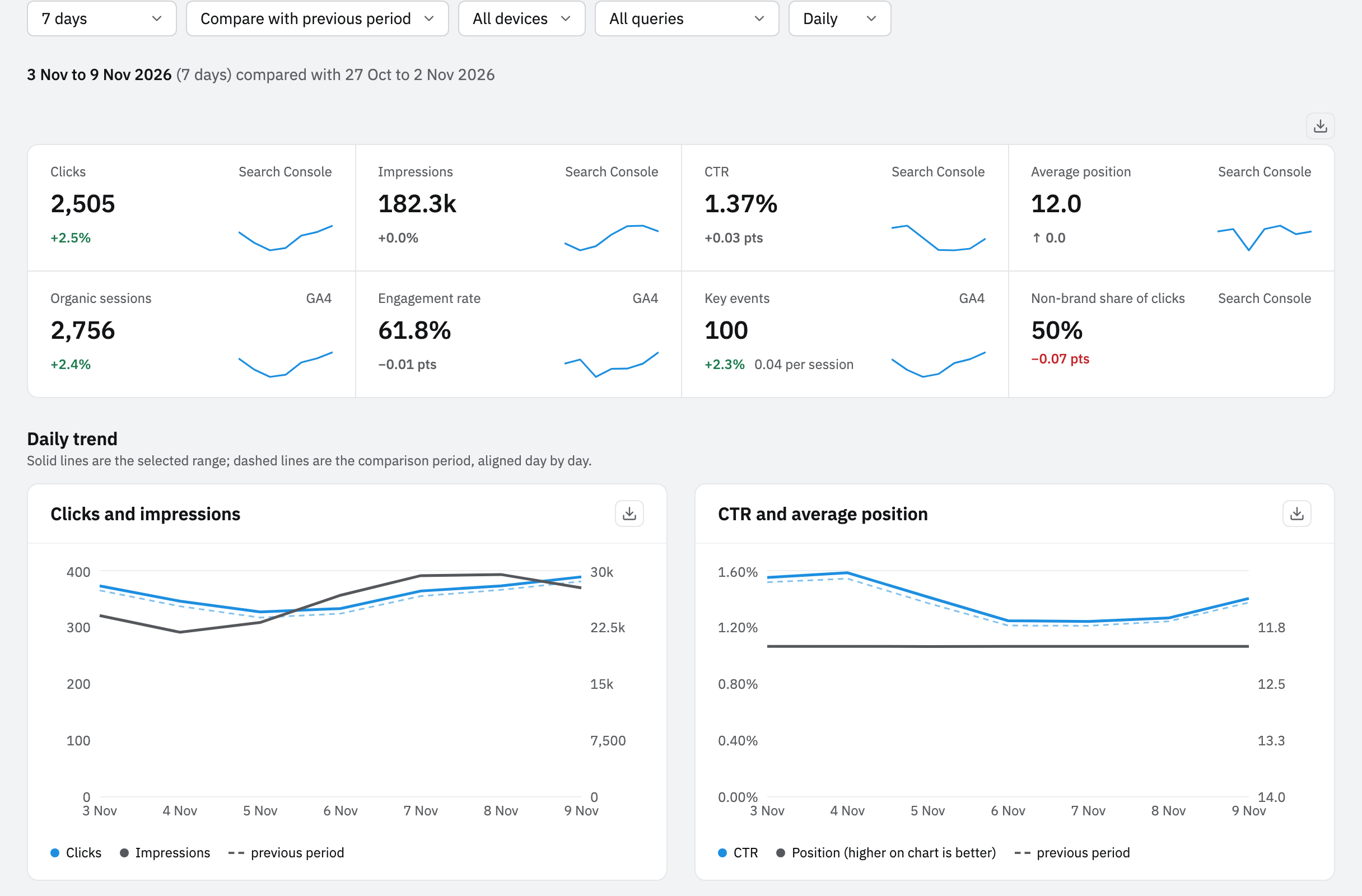
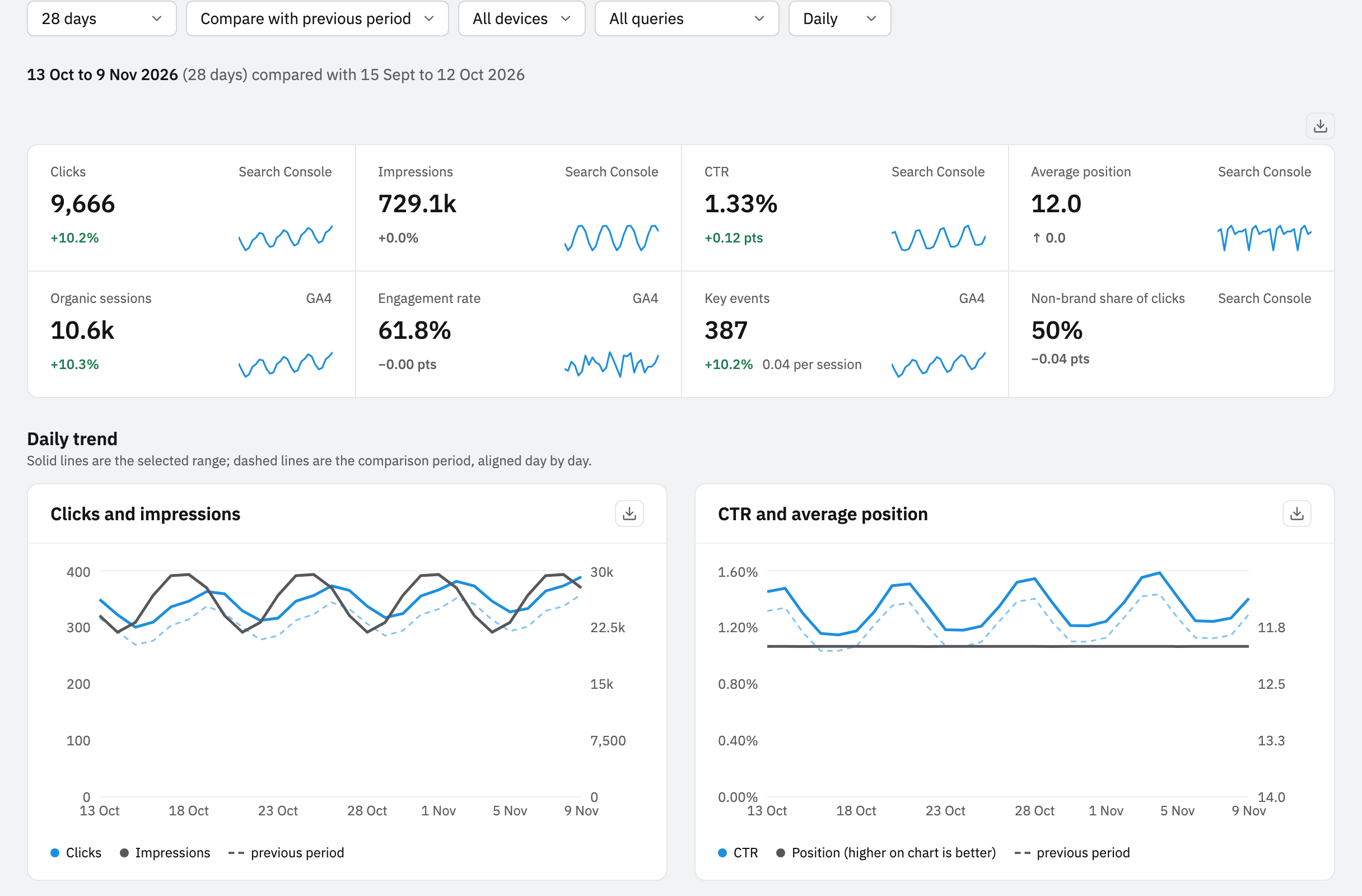
SEO Performance overview for ACME CRM: eight figure tiles (clicks, impressions, CTR, average position, organic sessions, engagement rate, key events, non-brand share of clicks), each with its change, above daily trend charts.SEO Performance overview for ACME CRM: eight figure tiles (clicks, impressions, CTR, average position, organic sessions, engagement rate, key events, non-brand share of clicks), each with its change, above daily trend charts.Ranking movers for ACME CRM: 4 keywords gaining ground and 2 losing, click change +15, above the Keywords table.The Keywords table for ACME CRM, with clicks, impressions, CTR, position and their changes.The Pages table for ACME CRM, with clicks, impressions, CTR, position and their changes per page.Page experience for ACME CRM: five Core Web Vitals charts against Google's good and poor thresholds, above the Brand terms box.
Exploring views automaticallyFigures run to Google's last complete day
How it works

From your Google data to a clearer SEO action plan.

No complicated setup or manual reporting. The Ripplix team connects your Google properties, crawls your website and brings the insights together in one place.

01

Connect

Your Google data, in one place.

We connect your Google Search Console and Google Analytics 4 properties. Your available historical data is imported, and new performance figures are updated daily.

02

Crawl

Understand your entire website.

We crawl your website to identify technical issues, missing elements and opportunities that may affect how search engines and AI crawlers access your pages.

03

Measure

Track keywords and pages.

Monitor clicks, impressions, click-through rates and average positions across your keywords and pages. Compare performance with the previous period or the same period last year.

04

Prioritise

Know what needs attention first.

Get a prioritised view of technical issues, opportunities and warnings, along with the number of affected URLs, what each finding means and how to address it.

05

Monitor

See what has changed.

Track keyword movements and compare successive site audits to understand what's improving, what's getting worse and where further attention is needed.

Ranking movers

Spot the keyword movements that matter.

Not every ranking change has the same impact. See which keywords have entered the top three, reached page one or dropped out of page one. Compare the last 7 or 28 days with the preceding period and see how much traffic those movements have gained or lost.
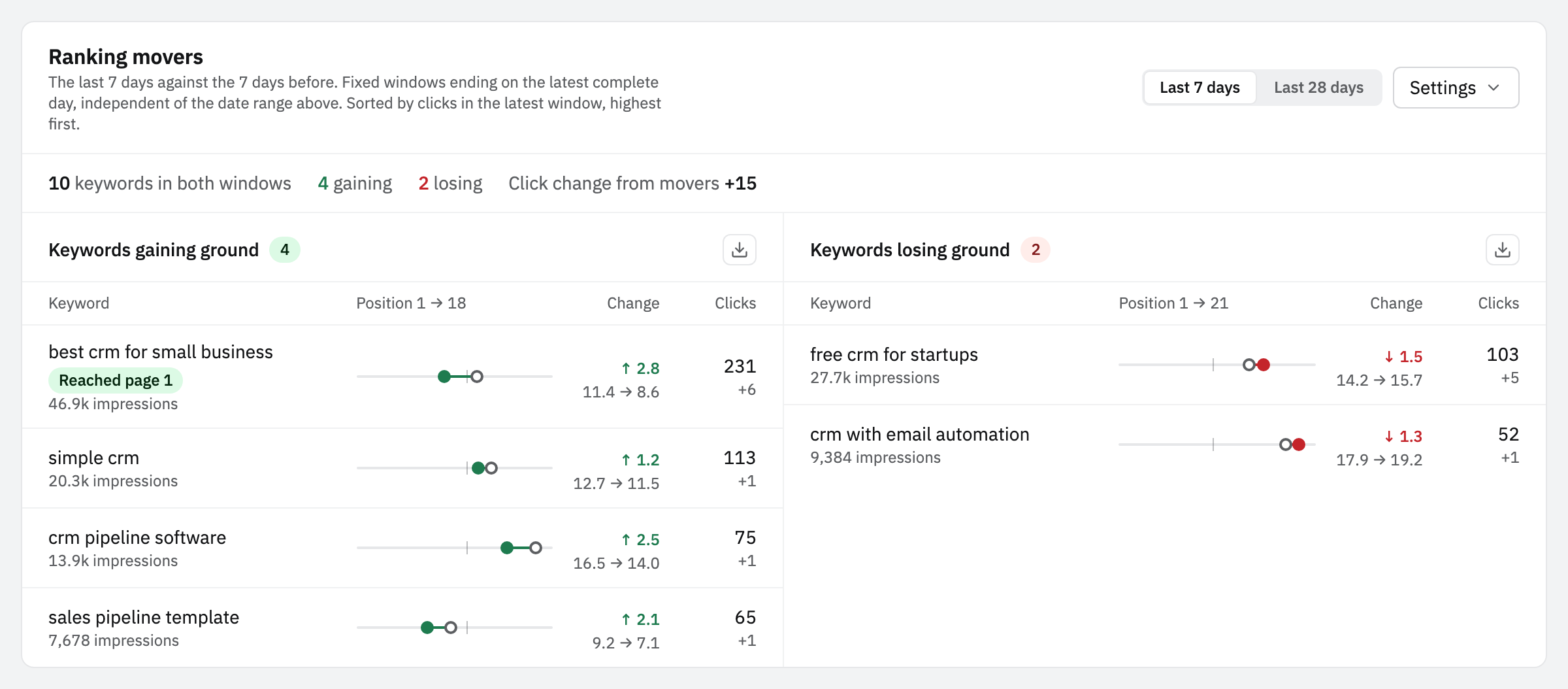
Ranking movers for ACME CRM: 4 keywords gaining ground and 2 losing, click change +15; best crm for small business moved from 11.4 to 8.6 with a Reached page 1 badge.

ACME's week: 4 keywords gaining ground, 2 losing, and "best crm for small business" newly on page 1, from position 11.4 to 8.6.

Keyword & page analysis

Go beyond overall rankings. Understand performance at keyword and page level.

Explore every tracked keyword and page with filters for match type, position and site section. Understand which pages rank for each keyword, spot keyword cannibalisation and identify where your organic visibility is growing.

The Keywords table for ACME CRM: acme crm (Brand) 3,153 clicks, +295; best crm for small business 894 clicks at position 8.6; and more, each with clicks, impressions, CTR, position and their changes.
Page experience

Understand the experience your website delivers to real visitors.

Monitor Google's Core Web Vitals and key loading performance metrics to identify pages that may be creating a poor user experience. Track performance across mobile and desktop and see how your site measures against Google's recommended thresholds.
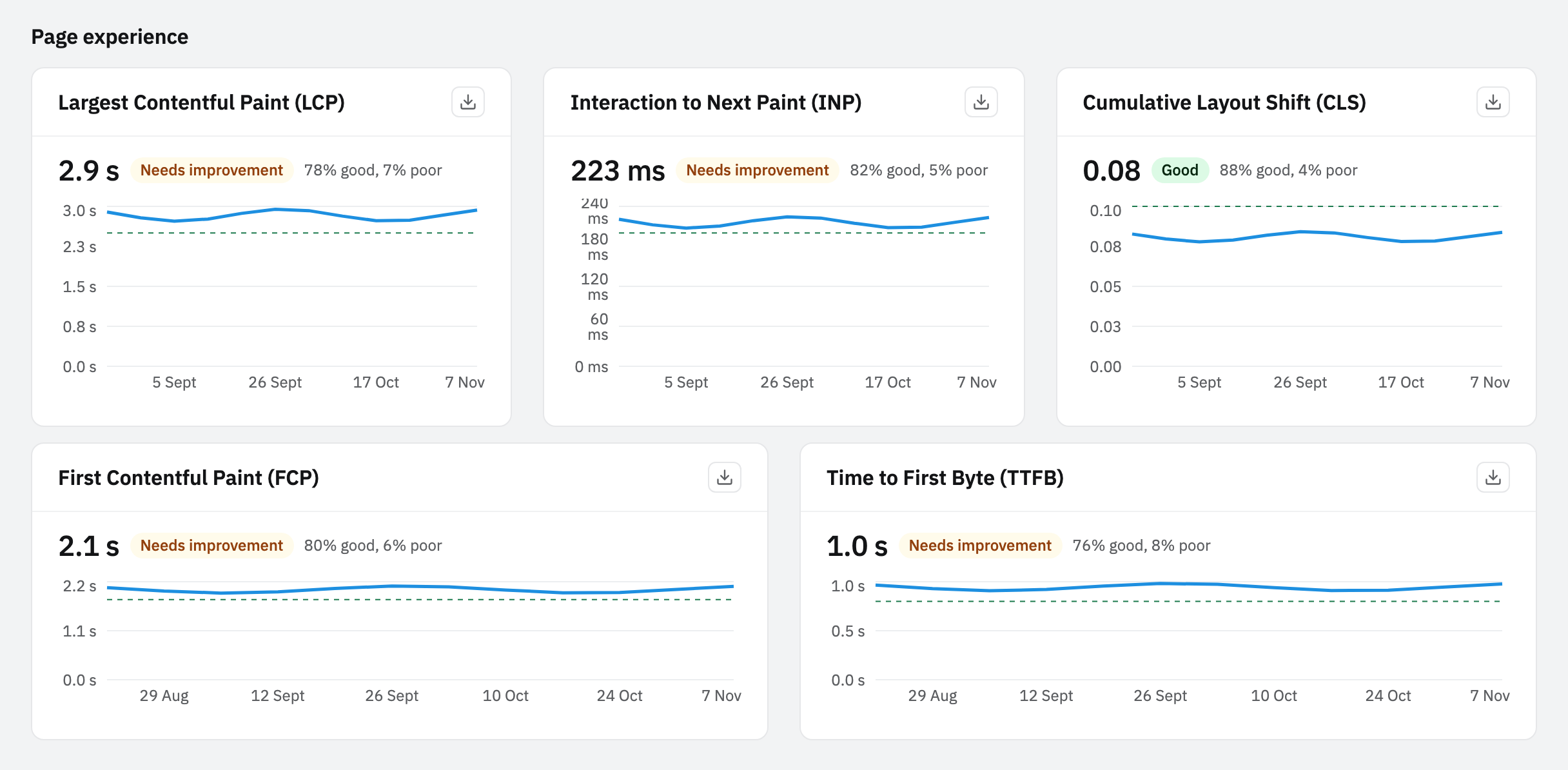
Page experience for ACME CRM: LCP 2.9 s (Needs improvement), INP 223 ms, CLS 0.08 (Good), FCP 2.1 s and TTFB 1.0 s, each as a line over time against the good and poor thresholds.

See how your site does in Google, next to how AI sees it.

Start with your free AI Visibility Report. SEO Performance and Site Audit are switched on for your site by the Ripplix team.

Technical site audit

Find what's holding your website back. Know what to fix first.

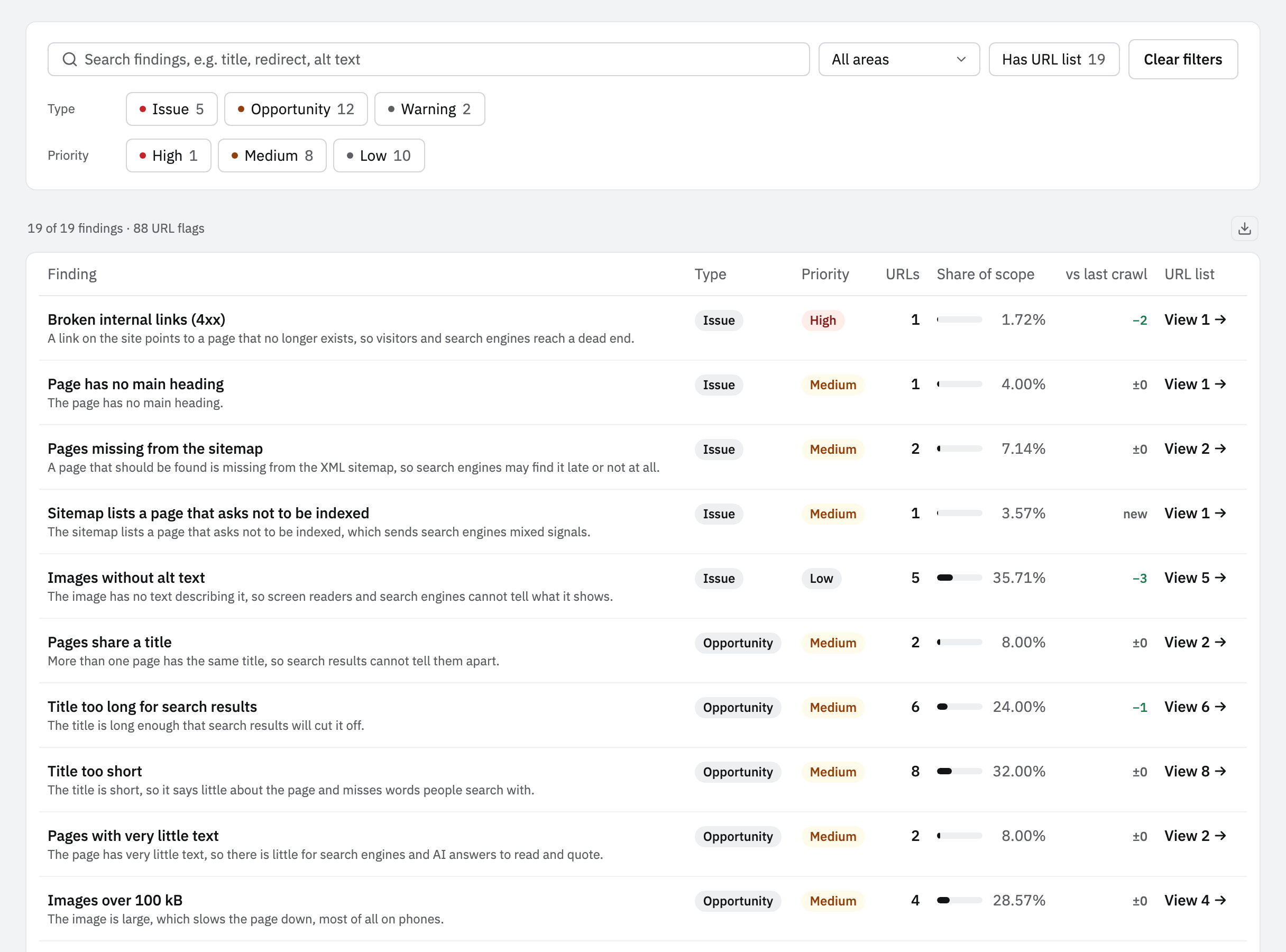
A comprehensive crawl of your website, translated into a prioritised list of technical issues, opportunities and warnings. See where problems occur, how many pages are affected and what needs to be done to address them.
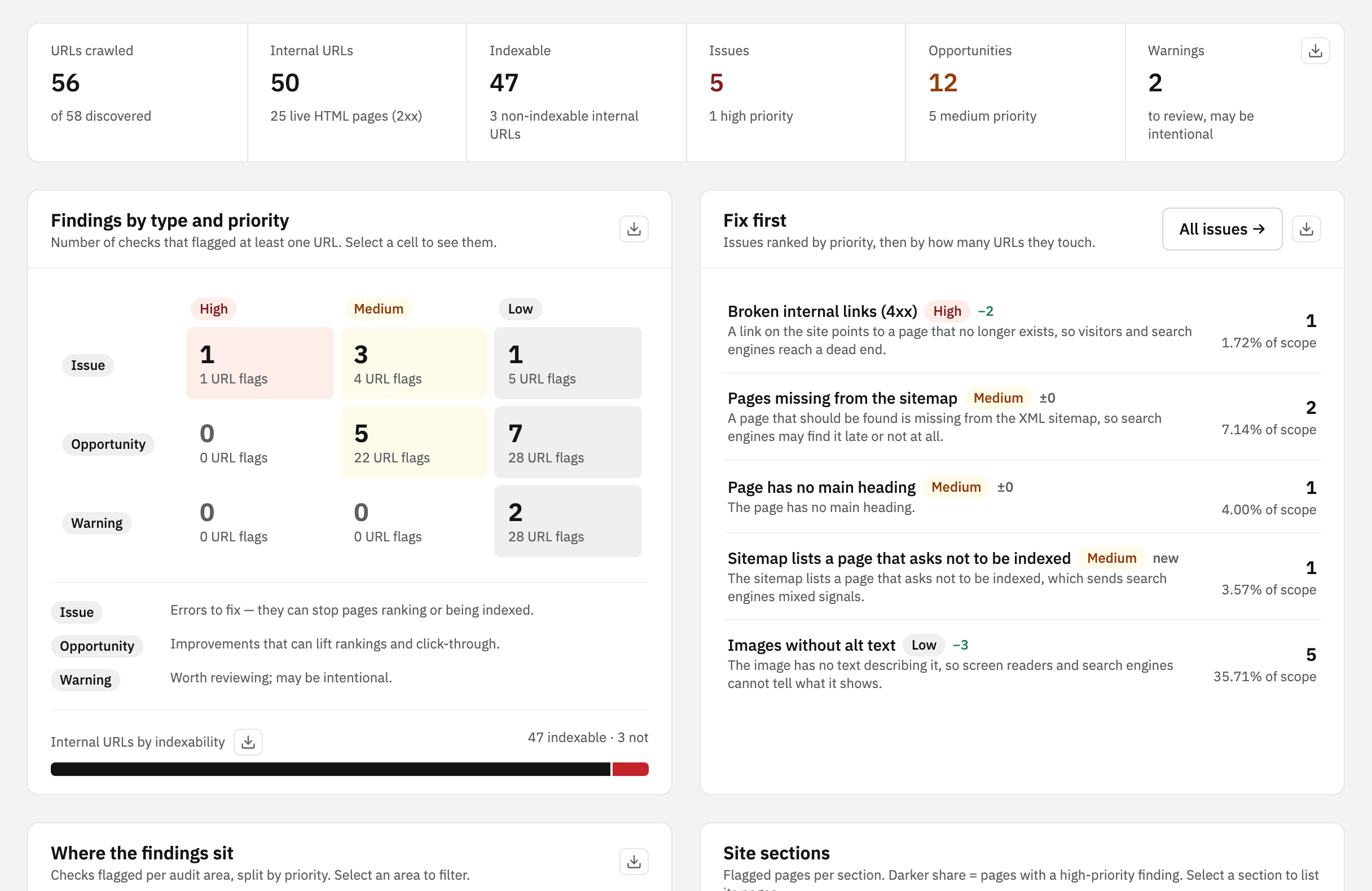
Site Audit · ACME CRM · acmecrm.example · 56 URLs crawled
Crawl loaded
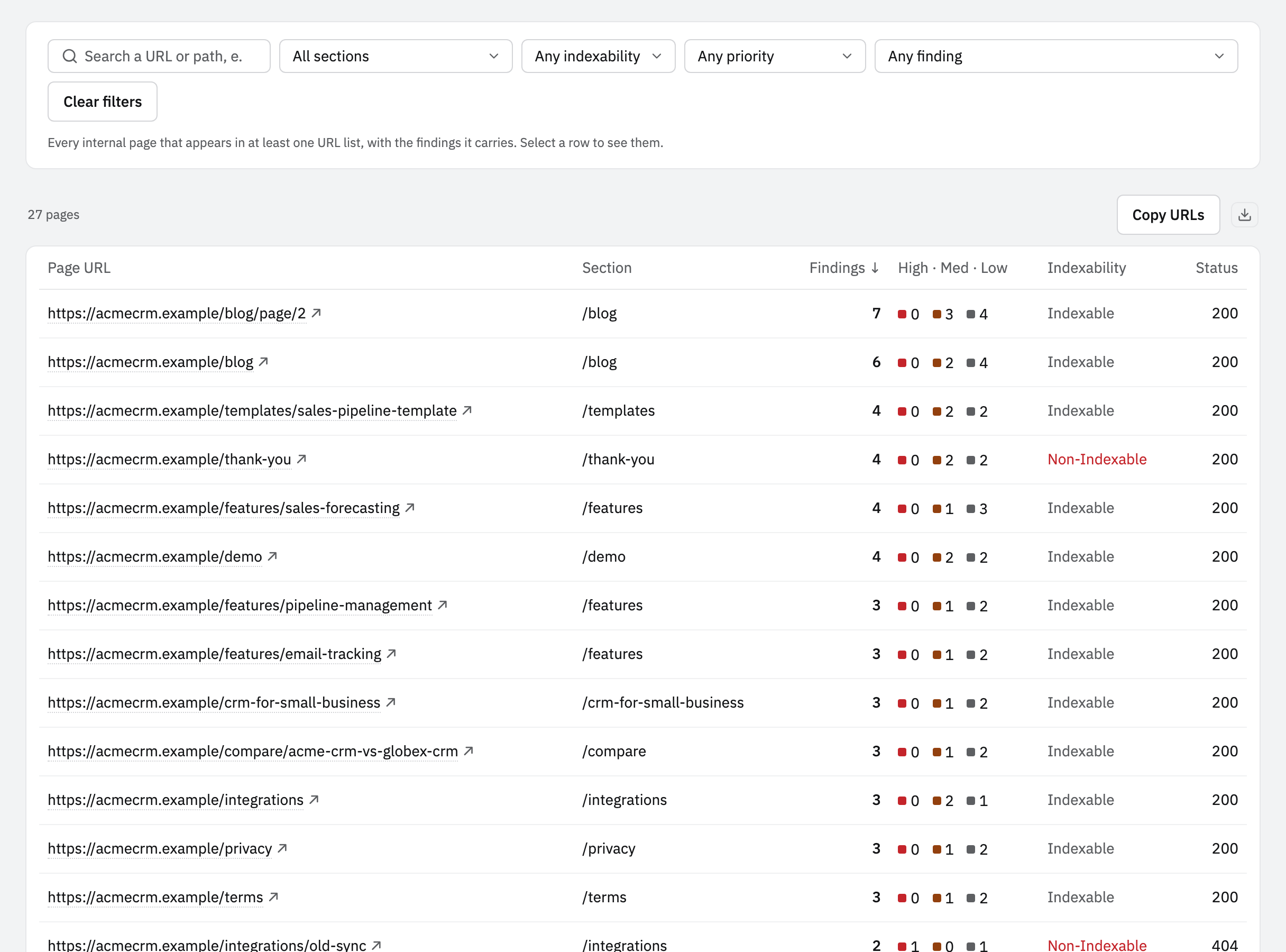
Site Audit overview for ACME CRM: 56 URLs crawled, 5 issues (1 high), 12 opportunities, 2 warnings; a findings grid by type and priority; and a Fix first list.The Findings tab for ACME CRM: 19 findings filtered by type and priority, each with its type, priority, URL count, share of scope, change since the last crawl and a URL list.The Pages tab for ACME CRM: every page with the findings it carries, by section, indexability and priority.
Issue, Opportunity or Warning, by High, Medium and Low priorityRefreshed each time a new crawl is processed

ACME's audit: 5 issues (1 high priority), 12 opportunities and 2 warnings across 56 URLs. "Fix first" puts the broken link at the top, with the change since the last crawl.

Audit insights

Not just a list of errors. A clear picture of where your site needs attention.

Fix First

Issues are ranked by priority and the number of URLs affected. See what has changed since your previous audit and focus your team's effort where it matters most.

Where the Findings Sit

Understand which audit areas and sections of your website carry the most issues. Filter findings by area, site section and priority to get to the root of the problem.

Crawl Depth and Response Codes

See how your internal URLs respond to crawlers and how deeply they are buried within your website. Identify pages that may be difficult for search engines to discover and crawl.

Audit breakdown

See where your website's issues are concentrated.

Get a clear breakdown of technical and on-page findings across your website. See which audit areas have the most flagged checks, how severe they are, and which sections of your site are affected. Filter the findings, explore affected URLs and export the data to prioritise fixes.
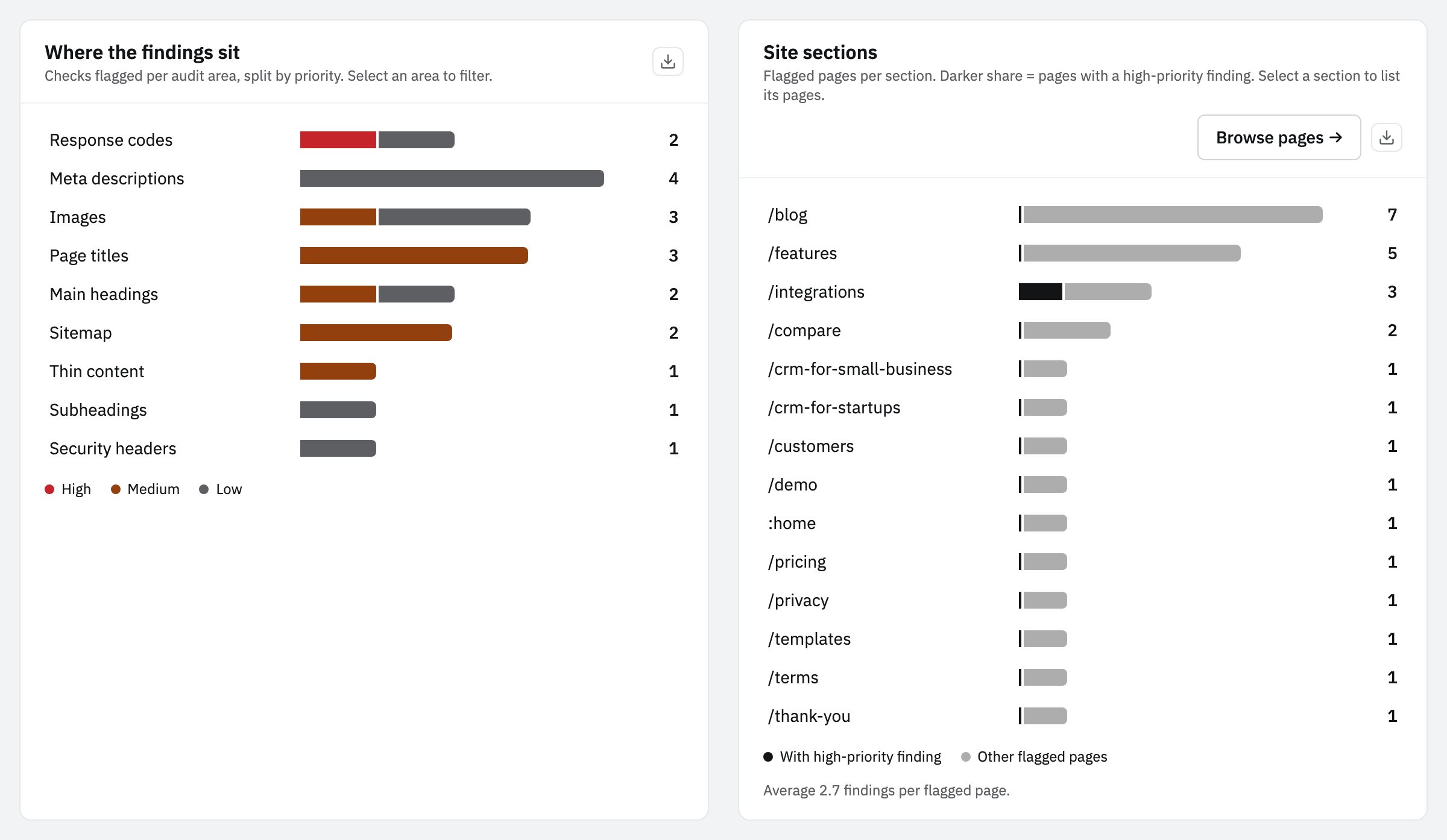
Two Site Audit cards for ACME CRM: Where the findings sit, with checks per audit area split by priority, and Site sections, with flagged pages per section such as /blog 7 and /features 5.

See where you stand in AI answers, then in Google.

Start with your free AI Visibility Report. SEO Performance and Site Audit live in the same account, one call away.

FAQ

Everything you wanted to know about SEO in Ripplix.

Short answers. For the long ones, talk to us.

What does SEO Performance show?
How your site does in Google search: clicks, impressions, click-through rate and average position for every keyword and page, plus organic sessions, engagement rate and key events from Google Analytics. Pick 7 days, 28 days, 3 months, 6 months or a custom range, and compare it with the period before or the year before. Ranking movers, a keyword and page explorer, and Page experience (Core Web Vitals) complete the screen.
Where does the data come from?
Your own Google Search Console and Google Analytics 4 properties. We connect them for you, and we only read them: nothing is written to your Google account. Your history comes in with the first import (Google keeps 16 months), so the screen is full from day one; new figures arrive every day and run to the last complete day Google has finalised.
How is Site Audit different from SEO Performance?
SEO Performance tells you how you are doing: the results Google sends you. Site Audit tells you why some pages do worse than they should: broken links, pages missing from the sitemap, pages that ask not to be indexed, missing headings, images without alt text, slow responses and more. One measures, the other finds what to fix.
Do I need to install anything or run the crawl myself?
No. We crawl your site and load the results into your account, and crawl it again when you ask. Each new crawl replaces the last on screen, and a change column shows what moved since the previous one.
Can I separate brand searches from non-brand?
Yes. Set your brand terms once (for example "acme crm, acmecrm"), and every keyword containing one of them counts as brand. The Non-brand share of clicks tile, the Queries filter and the Brand badge in the keyword table all follow that split, so growth from new buyers is visible on its own.
Can I export the data?
Yes. Every screen exports as CSV and PDF, every card has its own download, the keyword and page tables copy as CSV, and a finding's URL list copies straight into a spreadsheet.
Is this included in my plan?
SEO Performance and Site Audit are switched on for your site by the Ripplix team. Which plans include them is a question for the call; your free report shows a sample of both on ACME CRM, our example brand.
How does this fit with AI visibility?
It is the same account: your AI visibility screens, SEO Performance and Site Audit sit side by side in one login, with one team behind them. Growth in Google and growth in AI answers come from the same pages, so you fix them in one place.